
Two photos in.
Your RainDance AI video out.
Replace the two performers in a RainDance reference video with your photos. Make a 4–10 second edit in 720p or 1080p, keeping the original 16:9 scene and soundtrack. Review the result before sharing.
Cast your two people
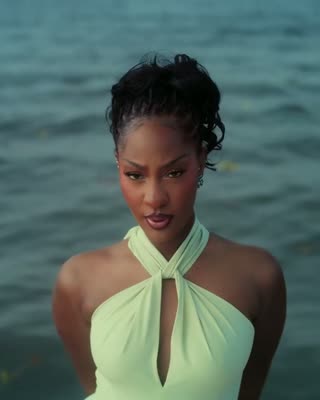
Photo 1
replaces the singer
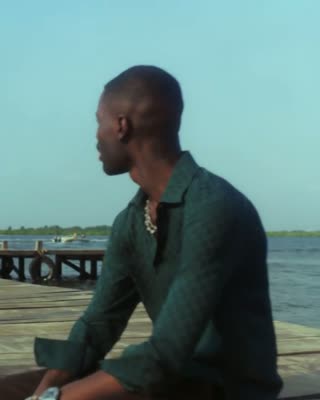
Photo 2
replaces the man on the pier
- Do:One person per photo
- Do:Face the camera
- Do:Even light
- Avoid:Group photos
- Avoid:Sunglasses or masks
Choose length and quality
Quality
Start with 4 s to check both faces before paying for a longer edit.
Make your video
You only pay for the length and quality you pick. Failed generations are refunded.


Only the two people change
- Pier, sea and beach from the original video
- Camera moves, cuts and timing
- Original soundtrack in the MP4
- Two photos in
- Original video reference
- Kling video editing
- 4–10 second edits
- Zero editing
- RainDance
- Two photos in
- Original video reference
- Kling video editing
- 4–10 second edits
- Zero editing
- RainDance
How it works
How to make a RainDance AI video in 3 steps
- 01
Upload two photos
Upload one clear, front-facing photo for each role. Photo 1 replaces the original woman; photo 2 replaces the original man. Use photos you have permission to use.
- 02
Pick quality and length
Choose 720p or 1080p and 4–10 seconds. The template keeps the original 16:9 frame, and the price updates before you generate.
- 03
Download and post
Review every shot for face, outfit and background consistency, then download the edited MP4.
Made from these two AI-generated photos
4 s · 720p · original soundtrack kept
The trend
What is the RainDance AI trend?
The RainDance AI trend recreates the music video for “Raindance” by Dave featuring Tems, released on 9 January 2026 and filmed in Lagos. One performer waits alone at the end of a wooden pier, the other sings close-ups by the water, and the two end up sitting together on the sand. The song went to No. 1 on the UK Singles Chart, and people now post AI versions with themselves and a partner or friend in the two roles.
This template edits those shots directly. Photo 1 replaces the singer and photo 2 replaces the man on the pier, while the pier, sea, camera movement and cuts stay as they are. You choose a 4–10 second excerpt at 720p or 1080p.
Start with a short preview. Check both performers in the wide shot and the solo close-up, along with the original camera movement and cut timing.
The finished MP4 keeps the original soundtrack. The reference footage and music are used under licence, and finished videos are for personal, non-commercial sharing. RainDance is not affiliated with or endorsed by the artists, their labels or any social platform.
Who it's for
Who can star in a RainDance AI video?
Try a clip with a partner, friend or adult family member who has agreed to appear. AI results vary, so begin with a short test and review both characters.
Couples
Turn an anniversary, a proposal teaser or a long-distance hello into the dock-and-beach love story. It also makes a sweet surprise to send before a date.
Best friends
Cast your best friend as the singer and post it as a birthday shout-out or a friendship tribute. Tag them and watch the comments roll in.
Siblings and family
Recreate the trend with a brother, sister, parent or cousin for a funny family moment everyone will share in the group chat.
Pets
Pet portraits are an experimental use of this human-character template. Accurate identity and anatomy are not guaranteed; review a short test before choosing a longer edit.
Preview before a longer edit
How much does a RainDance AI video cost?
A 4-second 720p edit costs 37 credits. The same test at 1080p costs 48 credits. The current reference supports up to 10 seconds.
Test clip · 4s
Check character replacement and scene consistency in a short edit before choosing a longer clip.
720p · 16:9 · video editing
Longer edit · 10s
Edit the complete 10-second source with the same two character references.
720p / 1080p · original 16:9 framing
FAQ
RainDance AI questions
Which song and video is the RainDance AI trend based on?
“Raindance” by Dave featuring Tems. Its January 2026 music video has the pier, the singing close-ups by the sea and the beach ending that the trend recreates. This template uses that footage under licence and replaces the two performers with the people in your photos.
How is RainDance AI different from other generators?
The editor uses the original video with two fixed character references. It aims to preserve the scenery, camera and cuts while replacing the performers. Check each shot before sharing.
Is RainDance AI free?
Videos use credits. A 4-second 720p edit costs 37 credits. The price updates before you generate; monthly and top-up credits last 30 days and yearly credits last 365 days.
How long is a RainDance AI video?
The current reference supports 4–10 second edits. A 4-second preview uses seconds 2–6 of the source so you can check the pier shot and singing close-up.
What resolution and framing are supported?
Choose 720p or 1080p. This template keeps the source video’s 16:9 framing to avoid changing the composition.
Do I need the original video or the song?
The original video is already attached to this template. Upload two character photos. We preserve the original music and vocals in the finished MP4, so preview and download use the same soundtrack.
Can I use photos of celebrities or other people?
Only photos you own or have permission to use. No public figures, no minors, and nothing sexual or harassing. When in doubt, ask the other person before you upload their photo.
How many credits does a video cost?
Credits depend on resolution and duration. A 4-second edit costs 37 credits at 720p or 48 at 1080p; a 10-second edit costs 82 or 108 credits. Your exact total is shown before you generate.
What happens if a generation fails?
Credits spent on a failed generation go straight back to your balance, so you can try again. If something still looks off, retry with brighter, more front-facing photos.
What photos work best?
One person or pet per photo, facing the camera, in bright and even light, framed from the head to the waist. Skip sunglasses, hats, heavy filters and mirror selfies.
Where do my finished videos go?
Every finished video is saved to your library, where you can watch it again and download the MP4 whenever you want to post.
Can I use RainDance AI on my phone?
Yes. RainDance AI runs in the browser on iPhone, Android and desktop, so you can upload, preview and download without installing an app.
Ready for your RainDance AI video?
Upload two photos, pick your settings and get your video in minutes.
Make my video